Here's how to delete a locker's details in LIV:
Deleting a locker helps manage unused or unnecessary storage spaces effectively.
1. Navigate to Extras: After logging in, access the Extras page and select the Locker Tab.
2. Action Button: Click on the Delete button depending on the task.
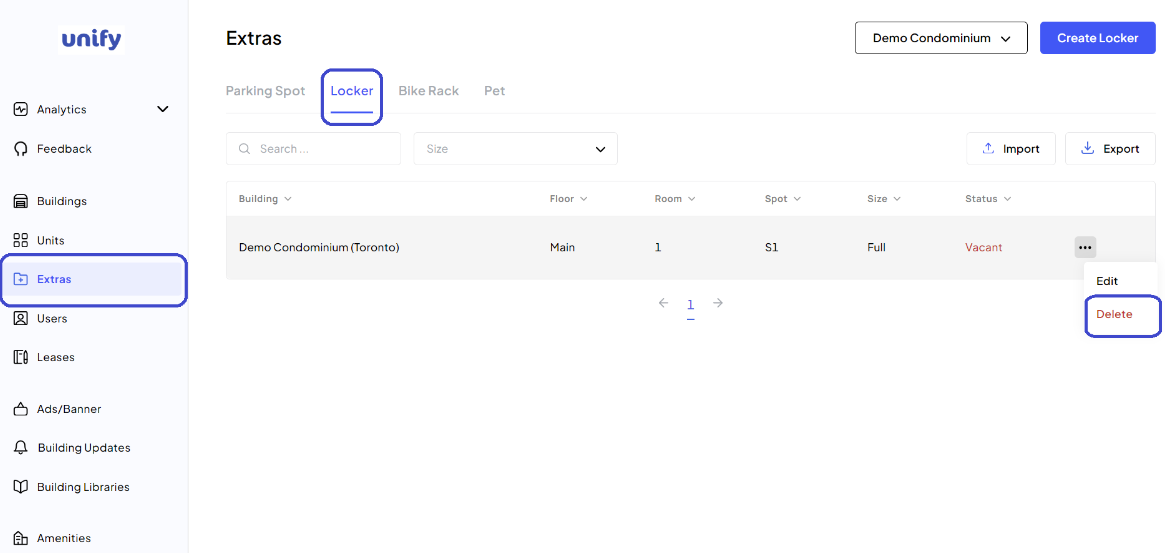
3. Begin Deletion: Click on the Action Menu next to the locker and select "Delete."
4. Confirm Deletion: Click the Delete Locker button in the popup.
5. Confirmation: The locker has been deleted.
Was this article helpful?
That’s Great!
Thank you for your feedback
Sorry! We couldn't be helpful
Thank you for your feedback
Feedback sent
We appreciate your effort and will try to fix the article