Here’s how to edit an existing pet in LIV:
Updating pet records ensures they reflect current tenant and pet information.
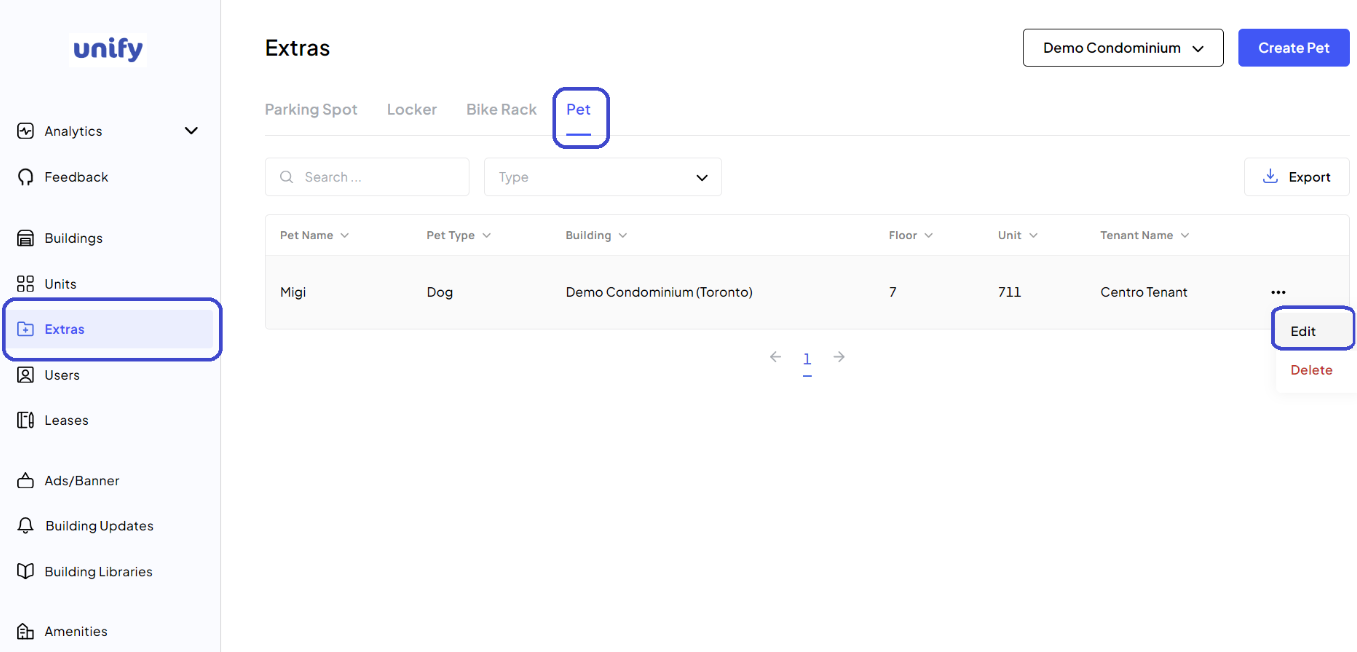
1. Navigate to the Extras Page:
After logging in, navigate to the Extras page. Select the Pet tab.
2. Select the Pet to Edit:
Use the Action Menu (three dots icon) next to the pet and select Edit.
3. Edit Pet Details:
Make the necessary changes to the pet’s details.
4. Save Changes:
Click the Edit button to save the updates.
5. Confirmation:
You have now saved new changes for the pet.
Was this article helpful?
That’s Great!
Thank you for your feedback
Sorry! We couldn't be helpful
Thank you for your feedback
Feedback sent
We appreciate your effort and will try to fix the article