Here's how to edit an existing Bike Rack details in LIV:
Updating a bike rack ensures it meets current tenant needs and usage patterns.
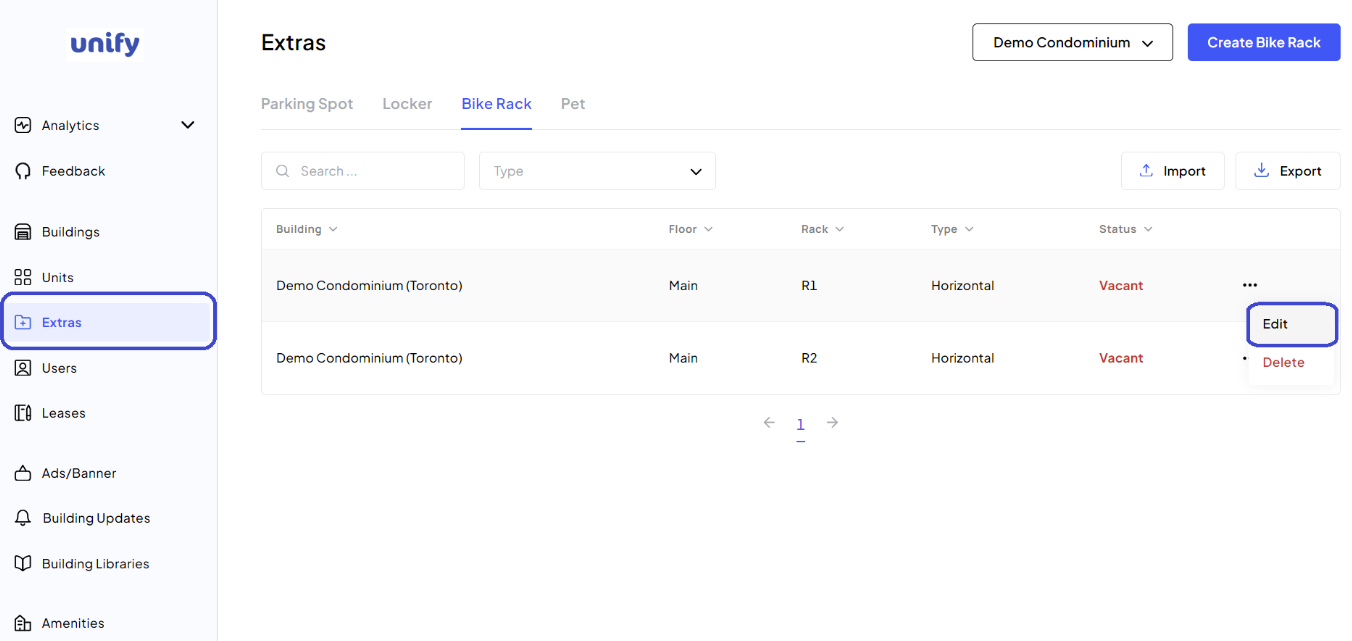
Navigate to the Extras page:
1. After logging in, navigate to the Extras page and select the Bike Rack tab.
Select the Bike Rack to Edit:
2. Select by using the Action Menu and selecting Edit.
Enter or Edit Details:
3. Provide or update the necessary information.
Completion:
4. Make Changes to the bike rack details and click the "Edit" button.
Confirmation:
5. New changes for the bike rack have been saved.
Was this article helpful?
That’s Great!
Thank you for your feedback
Sorry! We couldn't be helpful
Thank you for your feedback
Feedback sent
We appreciate your effort and will try to fix the article