Here’s how to delete a unit in LIV:
Removing a unit from your property management system can be necessary when reconfiguring spaces or after a demolition.
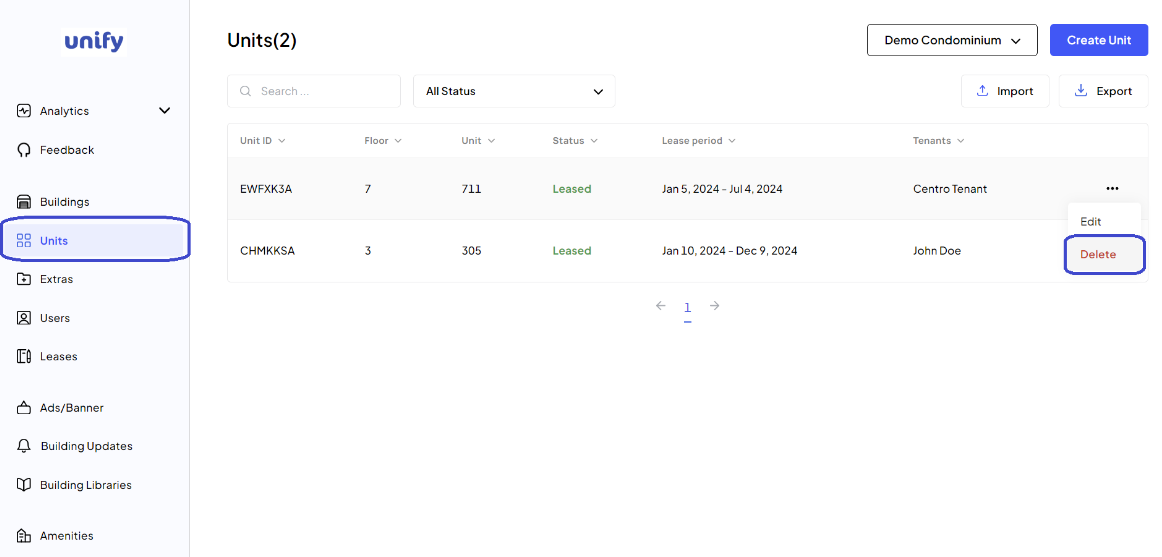
Navigate to Units Page:
After logging in, navigate to the Units page.
Choose Unit to Delete:
Use the Action Menu next to the unit you wish to remove and click Delete.
Confirm Deletion:
A confirmation popup will appear. Click the Delete Unit button to proceed with the deletion.
Confirmation:
You have now deleted the unit.
Was this article helpful?
That’s Great!
Thank you for your feedback
Sorry! We couldn't be helpful
Thank you for your feedback
Feedback sent
We appreciate your effort and will try to fix the article